hovercraft puts a tip on any HTML tag in a Shiny app or a bslib page. The tip shows when the pointer rests on the tag or keyboard focus arrives on it, and hides when either leaves. It is plain text, or drawn from a template and filled in from the values of one item, such as a row of a table.
A tip with text
tip_on() takes a tag and the text. The text is markdown
(strong, emphasis, code, links and short lists), shown as written: build
it with paste0() or sprintf() when it holds
values.
The tag comes back with the tip’s attributes and the engine’s script
and CSS attached, so it works wherever you put it: in a bslib page, in a
plain Shiny page and in output made later with
renderUI().
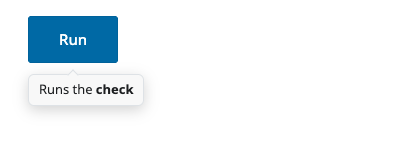
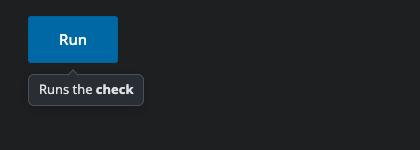
The tip follows the page. On a page with a
bslib::bs_theme() it uses the theme’s colours and turns
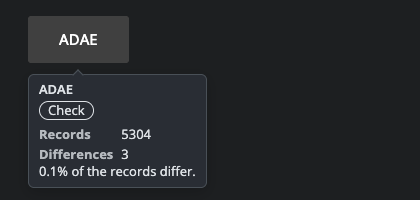
dark with bslib::input_dark_mode(). See
vignette("themes") to set its look yourself.
A tip from a template
When many tags show the same kind of tip, write the tip once as a template and give each tag its values.
tip_define(
  diff = tip_template(
    tip_title("{{ label }}"),
    tip_badge("{{ status }}"),
    tip_fields(Records = "{{ records | number:0 }}", Differences = "{{ differences | number:0 }}"),
    tip_text("{{ share | percent:1 }} of the records differ.")
  )
)
tip_define() returns tags: put it once in the page’s UI.
A template is a list of blocks, shown in order:
| Block | Shows |
|---|---|
tip_title() |
the first line |
tip_text() |
a paragraph of markdown |
tip_badge() |
a short label, coloured by status =
|
tip_fields() |
label and value pairs |
tip_code() |
code, as text |
A placeholder is {{ field }}, or
{{ field | number:2 }} and
{{ field | percent:1 }} to round. It names one field of the
record, exactly, and a value that is missing or blank shows a dash. A
mistake in a placeholder, such as one that never closes, stops with an
error when the template is made, not later in the browser.
A badge may say what state its item is in.
tip_badge("Check", status = "warning") takes one of
"success", "warning", "danger" or
"info", and any other word is an error that lists the four.
The colours come from the page’s Bootstrap colours, so they follow a
bslib theme and its dark mode. Colour never carries the meaning alone:
the badge’s own text should say it too.
Then name the template and give the tag a record, a named list of single values or a data frame of one row:
row <- list(label = "ADAE", status = "Check", records = 5304, differences = 3, share = 0.0006)
tip_on(htmltools::tags$button("ADAE"), template = "diff", record = row)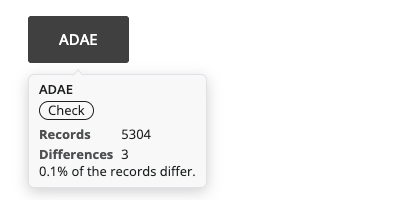
A short tip with a long form
more holds a long form that waits behind a “More” button
at the bottom of the tip. The button opens the long form in the same
tip, and “Less” closes it again. The tip stays open, on its side, and
grows away from the item; with the focus on the item or the pointer
resting on it, the M key does the same as the button,
except in a text field. The next time the tip opens it is short again,
and a pinned tip has the same buttons. Nothing needs a pin or an
id. tip_more(on = "click") opens the long form
on a click of the item instead (not on a control),
tip_more(pin = TRUE) makes the button pin the tip too, so
the long form stays, and
tip_more(as = "link", where = "start") draws the control as
an italic text link on the side you choose:
tip_on(
  htmltools::tags$button("Run"),
  "Runs the **check**",
  more = "Checks every column and prints a summary. Takes about a minute on the full data."
)tip_more() (experimental) chooses when the long form
shows: on = "hover" shows it with the short one,
on = "pin" shows it when the tip is pinned (the tag then
needs a pin and an id), and
label = changes the words of the buttons. A pinned tip that
grows sends input$<id>_pin with
state = "updated"; a hover tip that grows sends
nothing.
A tip on every row of a table
Give each row of a data frame to tip_on() as its record:
data[i, ] is a data frame of one row, which a record may
be. Once the template is defined, only the columns it names are kept, so
nothing else in the data is written into the page:
files <- data.frame(
  label = c("ADAE", "ADSL"),
  status = c("Check", "Same"),
  records = c(5304, 306),
  differences = c(3, 0),
  share = c(0.0006, 0),
  reviewer = c("A. Reviewer", "B. Reviewer")
)
rows <- lapply(seq_len(nrow(files)), function(i) {
  tip_on(
    htmltools::tags$tr(htmltools::tags$td(files$label[[i]]), tabindex = "0"),
    template = "diff",
    record = files[i, ]
  )
})
length(rows)
#> [1] 2
Once tip_define() has seen a template,
tip_on() keeps only the columns it names, so a record that
holds more is not written out in full. A record that holds a value a tip
cannot show, such as a list or a data frame, is an error that says
which.
A template needs no tip_define() when it is only used
here: give template a tip_template() and it
travels with the tag, with its fields checked against the record. Plain
text takes placeholders too once there is a record:
tip_on(
  htmltools::tags$button("ADAE"),
  "{{ differences }} differences in {{ records }} records",
  record = files[1, ]
)Without a record the braces stay as written.
Putting a tip on a tag again
A second tip_on() on a tag replaces its tip whole: the
words, look, id, events, pin and
when_disabled of the first call are gone, and the new call
says what it needs. When the old tip had an id,
events or a pin and the new call names none of them,
tip_on() warns once (class
hovercraft_warning_retip). A tag with a title
attribute keeps it, so the browser’s own tooltip shows beside the tip;
tip_on() warns (class
hovercraft_warning_title) and asks you to remove the
title. tip_on() takes one tag: to tip a tab,
tip the tag that is its title and give the tab a value,
nav_panel(title = tip_on(span("Data"), "..."), value = "data").
Keyboard users
A tip shows on keyboard focus, so a tag that cannot take focus, such
as a table row or a div, gives a keyboard user no way to
its tip. tip_on() looks at the tag and at everything inside
it, so the div that Shiny puts around an input is fine, and
says so once for a tag with nothing focusable in it. It never adds a tab
stop itself, because a table of 3,000 rows would become 3,000 Tab stops:
give the tags worth a stop tabindex = "0", as above, or put
the tip on a button or a link. The rows, cells and headers of a
DT::datatable() or reactable::reactable()
table are the exception: tip_table() gives the table one
tab stop and moves between them with the arrow keys.
A button that holds only an icon has no name for a screen reader.
When its tip is plain text and the button has no aria-label
of its own, tip_on() uses the tip’s words, without the
markdown marks, as the label:
The tip is then read once, as the button’s name; the engine does not also add it as a description.
In a Shiny app
library(shiny)
library(hovercraft)

ui <- bslib::page_fluid(
  tip_define(hint = tip_template(tip_title("{{ label }}"), tip_text("{{ n }} files"))),
  uiOutput("buttons")
)

server <- function(input, output, session) {
  output$buttons <- renderUI({
    tip_on(actionButton("go", "Go"), template = "hint", record = list(label = "Go", n = 3))
  })
}

shinyApp(ui, server)
A template belongs to the whole page. Inside a Shiny module,
namespace the template name with ns() — for example
tip_define(!!ns("row") := tip_template(...)) and
tip_on(..., template = ns("row")) — so two copies of the
module keep their own templates.
The words a tip shows itself
A tip says “Copy”, “Close”, “More” and “Pin this tip” in places. For
a page in another language, change them once with
use_hovercraft(labels = c(close = "Dismiss", copy = "Copy code")),
or for one tip and what is inside it with
tip_on(labels = ). The nearest words win, and a wrong key
stops with an error that lists the right ones.
Where to go next
- Tips in a Shiny app: pins, events, tips opened from the server, and live outputs in a tip.
-
Tips
on tables: a tip on every row, cell and header of a
DTorreactabletable. - A short tip with a long form
-
Themes
and looks, or
vignette("themes"). -
The
book, or
hovercraft_book(): every feature on one page, to try.