
In a minute
mascot puts a small character, drawn in code, into your
Shiny app or Quarto page. The character shows a mood with a status line
beside it and wiggles into its new face when the mood changes. You
control it from R with plain arguments; no AI service is involved. The
package is built for good-practice (GxP) work: a mascot
sits beside your ordinary field errors and results, and does not replace
them.
What you get:
-
A character with moods: four built-in characters
with five shared moods (
"idle","thinking","happy","worried"and"celebrating"). - Status text beside it: a visible text line next to the drawing so the face never speaks alone.
- Motion: a short wiggle on mood changes, plus nods and waves that respect reduced-motion settings.
-
Light and dark mode: follows your
bslibcolour toggle or Quarto’s theme mode. -
Your colours: built-in palettes, custom light and
dark colours, or brand colours from
bslib::bs_theme()(which parts it colours is experimental). - Offline by design: ships every script and style in the package, and shows a worried face if Shiny disconnects.
-
A studio to explore:
mascot_studio()(experimental) lets you try every function live and copy the R code.
Install the released version of mascot from CRAN:
install.packages("mascot")Or install the development version from GitHub with
pak:
# install.packages("pak")
pak::pak("insightsurge/mascot")
Try it without writing code
The fastest way to see what mascot can do is the studio,
a small app that runs on your computer and needs no internet. It is
experimental, so its looks may change, and it uses the optional
bslib and knitr packages.
-
mascot_studio()opens the studio. Pick a character, pick a function from the list, change its arguments and watch the mascot react. The R code to copy sits under the picture and always matches what you see. - Each function has a short guide page in the studio, with the same text as the website’s guide pages (Guides menu, Studio guide: every function).
-
mascot_studio(view = "theme")(ormascot_example("theme")) opens Theme a mascot. Choose one character, then try a ready-made palette, your own colours for light and dark mode, or the colours of your app’sbslibtheme. Its Check tab shows every mood in light and dark and warns about low contrast, and the code to copy is the shortestmascot_theme()call that gives the same look. -
mascot_studio(view = "examples")lists the bundled example apps. You can also open the theme page from the studio’s More menu. - To start on one function or character, name them:
mascot_studio(fn = "mascot_theme", character = "sela").
mascot_studio()
mascot_studio(view = "theme")
Your first app
Suppose you have a batch review page where Tessa, the default
character, waits in the corner until someone clicks Finish
review, then smiles and confirms that every row passed. Put
this code in an app.R file and run it from an interactive R
session:
library(shiny)
library(mascot)

ui <- fluidPage(
  h1("Batch review"),
  actionButton("finish", "Finish review"),
  mascot("helper", status = "Ready to review")
)

server <- function(input, output, session) {
  observeEvent(input$finish, {
    update_mascot(
      "helper",
      mood = "happy",
      status = "Review complete",
      bubble = mascot_bubble("All rows checked.", duration = 5)
    )
  })
}

shinyApp(ui, server)
How each line works:
-
library(shiny)andlibrary(mascot)load Shiny and the package. -
mascot()adds Tessa in the bottom-right corner with the id"helper"and"Ready to review"beside her. -
observeEvent(input$finish, { ... })waits for your user to click Finish review. -
update_mascot()updates"helper"in place using the same id. -
mood = "happy"andstatus = "Review complete"change Tessa’s face and status text together. -
mascot_bubble()shows a speech bubble above Tessa that closes after five seconds (duration = 5).
Open an example
You can try the bundled Shiny apps before writing your own code.
-
mascot_examples()lists the seven bundled example apps in teaching order. -
mascot_example()runs an example by name, or returns the path to itsapp.Rwithrun = FALSE. -
mascot_studio()(experimental) opens an app where you can click through every function and copy the code.
mascot_examples()
#>         name                        title
#> 1     studio                Mascot studio
#> 2 form-check                 Check a form
#> 3  long-task           Show task progress
#> 4    modules              Work in modules
#> 5      theme               Theme a mascot
#> 6      golem                Work in golem
#> 7      rhino Use a rhino-shaped structure
#>                                                                                             description
#> 1                            Every function and argument, live, with explanations and the code to copy.
#> 2                               A worried helper names invalid fields and becomes happy when both pass.
#> 3     Thinking during a slow step, then success or a lasting error bubble. Requires promises and later.
#> 4                                                Two module helpers and a parent-owned floating helper.
#> 5 A palette, your own or your brand's colours, the code to copy and every mood checked. Requires bslib.
#> 6               Function-built UI, golem runtime options and two nested review modules. Requires golem.
#> 7                             Plain Shiny view modules with two nested reviews; no rhino or box needed.
mascot_example("form-check")
mascot_studio()
The big ideas
-
One id connects UI and server: pass the same id
string to
mascot()in the UI andupdate_mascot()in the server, naming all other arguments. - Mood plus status text: the text beside the character carries the meaning for your users and screen readers, so the face never stands alone.
-
NULLleaves a setting unchanged: inupdate_mascot(),NULLkeeps the current value on the page, while calling a helper such asmascot_bubble()with no arguments resets it. -
Bad runtime values warn without crashing: invalid
values in
update_mascot()warn and leave the mascot untouched instead of stopping the app. -
Helpers are optional shortcuts: pass a plain value
like
size = 180, or usemascot_size()when you want extra options.
Moods and status
When a form has missing entries or a report takes 20 seconds to build, update the mood and status line together so people using your app can see what is happening.
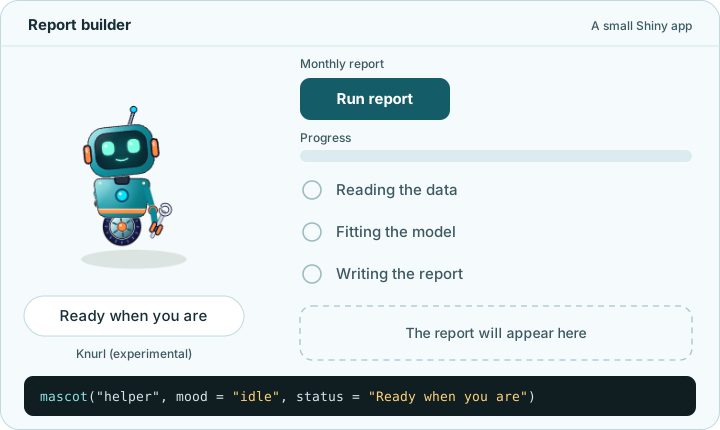
- Every character has five shared moods (
"idle","thinking","happy","worried"and"celebrating"), listed bymascot_moods(). - Set a mood by name or with
mascot_mood()inmascot()andupdate_mascot(). - Leave
status = NULLinmascot()to use the mood’s default status line, or pass your own text withmascot_status(). - For a slow task, show the
"thinking"mood first, do the work, then update the mood when it finishes ("long-task"inmascot_example()shows how). - Choose a character with
mascot_character(), list them withmascot_characters(), and see their families and attachment points withmascot_families()andmascot_anchors(). - Tessa and Sela are stable, while Knurl and Neer are experimental and may change (with a warning one release before any removal).
mascot_characters()
#>      id  name
#> 1 tessa Tessa
#> 2  sela  Sela
#> 3 knurl Knurl
#> 4  neer  Neer
#>                                                                                        description
#> 1     A calm teal hexagonal maker with a silver ring, a bow and a chest badge that shows her mood.
#> 2            A reassuring lilac Hexonian with time blocks; suits scheduling and resource planning.
#> 3 A single-wheeled repair bot with a clamp arm and screen visor; suits job queues and diagnostics.
#> 4                                                           A blue wave crest with a scallop clip.
#>       family is_default built_in    lifecycle
#> 1  hexonians       TRUE     TRUE       stable
#> 2  hexonians      FALSE     TRUE       stable
#> 3  visorfolk      FALSE     TRUE experimental
#> 4 elementals      FALSE     TRUE experimental
#>                                                                                                                                          palettes
#> 1                                        night_teal, sea_green, forest, spring, peach, coral_navy, desert_coral, rose_soft, lilac_soft, mist_navy
#> 2 lilac_violet, orchid, coral_navy, azure, peach_ink, lilac_soft, mist_navy, desert_clay, forest, apricot_navy, blush_plum, lilac_dusk, sea_green
#> 3                                                                                                  original, orbit, carbon, cobalt_droid, crimson
#> 4                                                                                       original, lagoon, glacier, coral_reef, night_bay, monsoon
mascot_moods("tessa")
#>          name                                          description
#> 1        idle                          At rest; the starting mood.
#> 2    thinking    Working on something, such as a long calculation.
#> 3       happy                                 Something went well.
#> 4     worried Something needs attention, such as an invalid field.
#> 5 celebrating              A big success, such as a finished task.
#>                               status shared fallback
#> 1 Resting, ready for the next piece.   TRUE     <NA>
#> 2     Working out how the parts fit.   TRUE     <NA>
#> 3         That came together nicely.   TRUE     <NA>
#> 4      One part needs a closer look.   TRUE     <NA>
#> 5       Finished, and built to last.   TRUE     <NA>
update_mascot("helper", mood = "worried", status = "2 fields need attention")
update_mascot("helper", mood = "happy", status = mascot_status())
You can read and check a character file with mascot_read_character()
or mascot_check_character()
(both experimental) and pass the result to
mascot_character(), mascot(),
update_mascot() or mascot_preview().
Saving and registering characters and palettes are planned for a later
release. See Write
your own character for details.
Message bubbles
While the status line shows the current state, a speech bubble announces a specific event, such as three skipped rows in an uploaded file.
- Pass a string or
mascot_bubble()tobubbleinmascot()orupdate_mascot(). - A bubble stays for five seconds (
duration = 5) and shows a close button by default. - Use
duration = Inffor a message your user must act on so it stays until closed or cleared withmascot_bubble(). - The timer pauses on hover, on keyboard focus, or while the mascot is minimised.
- Bubbles stay open across mood changes and character swaps.
- Plain text is shown as written (any HTML in it is not run), or you
can pass trusted markup with
htmltools::HTML()or self-containedhtmltoolstags.
mascot_bubble("Three rows skipped.")
mascot_bubble("Check the dates in column B.", duration = Inf)
mascot_bubble()
update_mascot(
  "helper",
  mood = "worried",
  status = "Import needs attention",
  bubble = mascot_bubble("Check the dates in column B.", duration = Inf)
)
One-off gestures
When someone saves a filter or switches tabs, a one-off gesture plays a quick nod or wave without changing the character’s mood.
- Send a gesture from the server with
gestureinupdate_mascot(), using a name like"nod"ormascot_gesture(). - Every character has
"nod"to acknowledge an action and"wave"to greet, listed bymascot_gestures(). - If you change the mood and send a gesture in the same call, the new mood appears first.
- A character swap already includes a greeting wave, so any extra gesture in that update is skipped.
- Reduced-motion settings or
mascot_motion_settings()can skip the movement while keeping the rest of the update.
mascot_gestures("tessa")
#>      name                                                       description
#> 1     nod                    A short nod, such as to acknowledge an action.
#> 2    wave A wave, such as a greeting; characters without arms rock instead.
#> 3    rock                                                      Rock gently.
#> 4 shimmer                                 A glint runs once round the ring.
#>   fallback frames
#> 1     <NA>     18
#> 2     rock     30
#> 3     <NA>     18
#> 4     <NA>     45
update_mascot("helper", gesture = mascot_gesture("nod"))Size and placement
A mascot can float in a window corner as an app-wide helper or sit inline inside a card right next to a form.
- By default,
mascot()draws at160pixels in the"bottom-right"corner with a minimise button (minimise = TRUE). - Set
sizeto a pixel number (at least24), a percentage like"20%", ormascot_size(). - On phone screens,
small_screen = "auto"shrinks floating mascots to at most96pixels while leaving inline mascots unchanged. - Set
placementto"inline", a corner name like"top-left", ormascot_placement(). - Minimising a floating mascot turns it into a round restore button
and sets
input$<id>_minimisedin Shiny. - Set
drag = "snap"for corner snapping ordrag = "free"(experimental) for free dragging. In Shiny, each drop updatesinput$<id>_position, in either mode.
mascot_size(180, small_screen = 72)
mascot_placement("bottom-right", minimise = TRUE, drag = "snap")
mascot("card_helper", size = 120, placement = "inline")
mascot("corner_helper", placement = mascot_placement("bottom-right", drag = "snap"))
update_mascot("corner_helper", placement = mascot_placement("top-left"))
Theme and light/dark mode
When your app has its own brand palette or a dark mode switch, you
can match the character’s colours through theme.
- Leave
theme = NULLinmascot()to keep the character’s own colours (or pass"original"inupdate_mascot()to restore them). - Pick a built-in palette from
mascot_palettes(), such astheme = "coral_navy"for Tessa. - Use
mascot_colour_roles()to see a character’s parts and which leader roles they follow when you set only a few colours. - Pass
lightanddarklists inmascot_theme()for separate light and dark colours, orcssfor browser CSS variables (experimental). - Pass a
bslib::bs_theme()to fill the character’s primary and secondary brand roles (experimental role mapping). - By default,
mode = "auto"followsbslib::input_dark_mode()or Quarto’s dark mode, and stays light when the page gives no signal. - To try colours before you choose, open Theme a
mascot with
mascot_studio(view = "theme").
mascot_palettes("tessa")
#>            name
#> 1    night_teal
#> 2     sea_green
#> 3        forest
#> 4        spring
#> 5         peach
#> 6    coral_navy
#> 7  desert_coral
#> 8     rose_soft
#> 9    lilac_soft
#> 10    mist_navy
#>                                                              description
#> 1                  The character's own colours, with no palette applied.
#> 2           Sea-green face, silver ring, dark navy hair and a coral bow.
#> 3                  Forest-green face, gold ring and bow, deep pine hair.
#> 4        Light spring-green face, gold ring, forest hair and a pink bow.
#> 5           Peach face, amber ring, plum-brown hair and a red-coral bow.
#> 6                 Pale peach face, coral ring, navy hair and a teal bow.
#> 7                 Sand face, coral ring, terracotta hair and a gold bow.
#> 8  Soft rose face, rose-gold ring, berry-brown hair and a pale gold bow.
#> 9    Soft lilac face, mauve ring, dusky violet hair and a pale gold bow.
#> 10       Pale blue-grey face, steel-blue ring, navy hair and a gold bow.
#>       source
#> 1     native
#> 2  character
#> 3  character
#> 4  character
#> 5  character
#> 6  character
#> 7  character
#> 8  character
#> 9  character
#> 10 character
pink_theme <- mascot_theme(
  light = list(body = "#B53D78", rim = "#A94A82"),
  dark = list(body = "#F2A6CF", rim = "#C5B0EB")
)

mascot("helper", theme = pink_theme)
update_mascot("helper", theme = "coral_navy")
Motion
On a busy review dashboard where extra movement would distract people, you can quieten or stop animation while keeping every mood and message working.
- Pass
motion = FALSEtomascot()orupdate_mascot()to stop all movement at once. - Use
mascot_motion_settings()to switchidle,mood_change,gestures,swap,minimising,restoringandmessageson or off individually. - Any switch left as
NULLfollowsothers(TRUEby default), soothers = FALSEwithgestures = TRUEallows only gestures. - A user’s browser or system reduced-motion preference always wins
over
TRUE. - After the mascot appears or changes (a new mood, a gesture or a
swap) it breathes and blinks for up to five seconds, then rests; and
mascot_gesture()triggers one-off movements when allowed.
mascot_motion_settings(idle = FALSE)
mascot_motion_settings(others = FALSE, gestures = TRUE)
mascot("still_helper", motion = FALSE)
update_mascot("still_helper", motion = mascot_motion_settings(idle = FALSE))
Clicks and menus
A mascot is a plain image by default so keyboard users never land on
a dead control, but click turns it into a button or a
menu.
- Leave
click = NULLinmascot()when clicking the character does nothing. - Pass a label like
click = "Open help"ormascot_action()for a single action that counts clicks ininput$<id>_click. - Pass
mascot_popup_menu()with a named character vector to open a menu that sends the chosen item’s name toinput$<id>_menu. - Opening or closing a menu never changes
input$<id>_click, and dragging never counts as a click. - Keyboard users can Tab to the button, press Enter or Space, use arrow keys in the menu, and press Escape to close it.
- Set
disabled = TRUEto pause clicks during a slow task, or pass an empty helper toupdate_mascot()to remove the click.
mascot(
  "helper",
  click = mascot_popup_menu(c(finish = "Finish review", reset = "Reset helper"))
)

observeEvent(input$helper_menu, {
  if (identical(input$helper_menu, "finish")) {
    update_mascot(
      "helper",
      mood = "happy",
      status = "Review complete",
      bubble = mascot_bubble("All checks finished.", duration = Inf),
      gesture = mascot_gesture("nod")
    )
  }
})
Shiny modules
When you split a larger Shiny app into modules, including
golem and rhino apps, each module can own and
update its own mascot.
- In the module UI, call
mascot()with a namespaced id such asmascot(ns("helper")). - Pass the plain local id
"helper"toupdate_mascot()insideshiny::moduleServer(). - Read
input$helper_click,input$helper_menu,input$helper_positionandinput$helper_minimiseddirectly from that module’sinput. - For one shared corner mascot across modules, return a reactive from each module and update the parent mascot from the top-level server.
- Run
mascot_example()with"modules","golem"or"rhino"to see full working apps.
review_ui <- function(id) {
  ns <- shiny::NS(id)
  shiny::tagList(
    shiny::actionButton(ns("finish"), "Finish review"),
    mascot(ns("helper"), placement = "inline")
  )
}

review_server <- function(id) {
  shiny::moduleServer(id, function(input, output, session) {
    shiny::observeEvent(input$finish, {
      update_mascot("helper", mood = "happy", status = "Review complete")
    })
  })
}
Quarto pages
You can also place mascot()
in a rendered Quarto document with no Shiny server to show a fixed mood
and status line.
- The character draws when the page loads, and stays static because there is no R session behind the page.
- Use
placement = "inline"(ormascot_placement()) to sit in the page flow, and give each mascot a uniqueid. - On a static page that never shows a bubble, hide the reserved bubble
space with
.mascot-bubble-region { display: none; }in CSS. - The mascot follows Quarto’s light and dark theme toggle and works in
self-contained pages (
embed-resources: true). - Quarto support is lightly tested so far, and a Quarto
shortcodeis planned for 0.2.0.
Put this in an R chunk of your .qmd file:
Check a look before using it
Before wiring a character or colour theme into your app, you can inspect every mood and size on one offline page or try controls live in the studio.
-
mascot_preview()(experimental) builds a static offline page showing every mood in light and dark mode across your chosen size and 160, 96 and 24 pixels. - Previews always draw mascots inline with
motion = FALSEby default so you can compare faces side by side. - Assign the result of
mascot_preview()to inspectattr(page, "contrast")for any custom colours below 3:1 contrast, and printpageto view it. -
mascot_studio()(experimental) opens an offline app where you can test every function, check themes withview = "theme", and copy R code. - Use
mascot_examples()andmascot_example()to browse or open the seven bundled example apps.
page <- mascot_preview(
  theme = mascot_theme(
    light = list(body = "#B53D78", rim = "#A94A82"),
    dark = list(body = "#F2A6CF", rim = "#C5B0EB")
  )
)
attr(page, "contrast")

mascot_studio(view = "theme")
Leave unchanged or reset
When you call update_mascot()
from the server, you can leave settings alone, replace them, or reset
them to their defaults.
- Leaving an argument as
NULLinupdate_mascot()keeps its current value, whereasNULLinmascot()means none or the default. - Passing an empty helper resets that setting to its starting state, as shown in the table below.
- Any non-
NULLargument replaces that whole setting at once (for example,size = 200also resetssmall_screento"auto"). - If any value in
update_mascot()is invalid, R warns and ignores the whole call so the mascot never updates halfway. - Updates sent before a
shiny::renderUI()mascot appears on screen are queued in order and applied as soon as it mounts.
| Setting | Reset sent to update_mascot()
|
Result |
|---|---|---|
| Character |
character =mascot_character()
|
Switches back to "tessa"
|
| Mood |
mood =mascot_mood()
|
Returns to "idle"
|
| Size |
size =mascot_size()
|
Resets to 160 pixels
(small_screen = "auto") |
| Custom status |
status =mascot_status()
|
Follows the mood again |
| Bubble |
bubble =mascot_bubble()
|
Removes the speech bubble |
| Theme |
theme =mascot_theme()
(or "original") |
Restores the character’s own colours |
| Click |
click =mascot_action()
(or mascot_popup_menu()) |
Makes the mascot a picture again |
| Placement |
placement =mascot_placement()
|
Floats in "bottom-right" ("inline" for
inline) |
| Motion |
motion =mascot_motion_settings()
|
Allows movement again |
# Change only the mood; status, bubble and theme stay as they were:
update_mascot("helper", mood = "thinking")

# Reset custom status, clear the bubble, and restore original colours:
update_mascot(
  "helper",
  status = mascot_status(),
  bubble = mascot_bubble(),
  theme = mascot_theme()
)
Where next
-
Studio guide pages: open Guides
> Studio guide: every function on the website (or
the Guide tab inside
mascot_studio()) for visual guides tomascot(),update_mascot(),mascot_theme()and every other export. -
Package reference: check the
Reference menu (or
?mascot,?"mascot-package"and?mascot_stylingin R) for all argument details, condition classes and CSS variables. -
Bundled example apps: use
mascot_examples()andmascot_example()to copy working apps for form checks, slow tasks, modules,golemandrhino. -
Custom characters (experimental): read Write
your own character to see how
mascot_read_character()andmascot_check_character()read and check a character file.